Beyond Durable Execution: Business-as-Code

In the early 2010's, Maxim Fateev observed at AWS that we would write code a lot differently if we didn't have to worry about server crashes: we could write Thread.sleep(Duration.ofDays(30))! This astute observation led to the creation of Durable Execution (AWS Simple Workflow, Cadence, and now Temporal).
In 2026, however, durability is becoming a commodity. What comes next? Rather than just caching the byte output of function call side effects, we move up the business stack and focus on delivering business value by managing and optimizing business processes. That is what LittleHorse's Business-as-Code approach does.
While LittleHorse and Temporal at first seem similar, the goal of Business-as-Code is much more ambitious than Durable Execution. Rather than stop after providing engineers with the ability to write durable long-running processes, Business-as-Code goes several steps further in order to allow engineers to rise up the business stack. LittleHorse provides the same durability guarantees as Durable Execution as a side effect (pun intended!) of durably-orchestrated business-level abstractions. In this post, we'll walk through:
- The philosophical differences between Business-as-Code and Durable Execution.
- A technical deep-dive into the architectural differences that result from those different philosophies.
- Features available in Business-as-Code platforms which Durable Execution cannot support due to those architectural differences.
The Philosophy
While Durable Execution gives engineers durability primitives to make code impervious to infrastructure failures, Business-as-Code models and orchestrates business flows across events, agents, and microservices.
Durable Execution Orchestrates Bytes
Durable Execution started as a project at AWS Simple Workflow (SWF) by Maxim Fateev. After AWS, Max continued working on the Durable Execution concept at Uber with an open-source project called Cadence, which he then forked into what is now Temporal. Max astutely observed that we engineers would write code very differently if we didn't have to worry about intermittent networks or crashes. For example, we would never put sleep(Duration.ofDays(30)); in production code that orchestrates a billing cycle. Just relying on RAM to persist a subscription means that anytime a kubernetes pod restarts, we would lose all of our subscriptions!
Durable Execution's philosophy (pioneered by Max and Temporal) is that we should be able to write code that sleeps for 30 days and doesn't worry about intermittent network errors. Durable Execution (especially Temporal) solves that problem quite elegantly! We'll see how shortly, and it is a very clever trick.
However, this approach stops short of orchestrating end-to-end business flows while remaining a valuable infrastructure plumbing tool.
Business-as-Code Models Business Flows
I started LittleHorse to go a few steps beyond Durable Execution, allowing engineers to contribute value higher up the business stack by not only making code reliable but also using that code to model and manage business processes.
LittleHorse provides the same durability primitives as Temporal, but goes further. Business-as-Code:
- Aligns software to business intention, visualizing the end product to make the code easier to audit and understand.
- Provides real-time insights into process execution by emitting events into Apache Kafka.
- Catalogs technical services and modules of business functionality, promoting reuse and governance.
Aligning Code to Business Intent
First, this approach bridges the gap between business workflows and technology. For example, the WfSpec (Workflow Specification) primitive reflects business processes in code, showing business-friendly diagrams to further collaboration between product and engineering while preserving a strong developer experience.
Business-as-Code automaticallly visualizes workflow code. This helps unify engineering and business intent. The visual representation is also useful when reviewing code written by agents: it provides a deterministically-generated, human-understandable, and business-friendly blueprint of the technical process created by the agents, allowing engineers and product owners to catch critical errors before production.
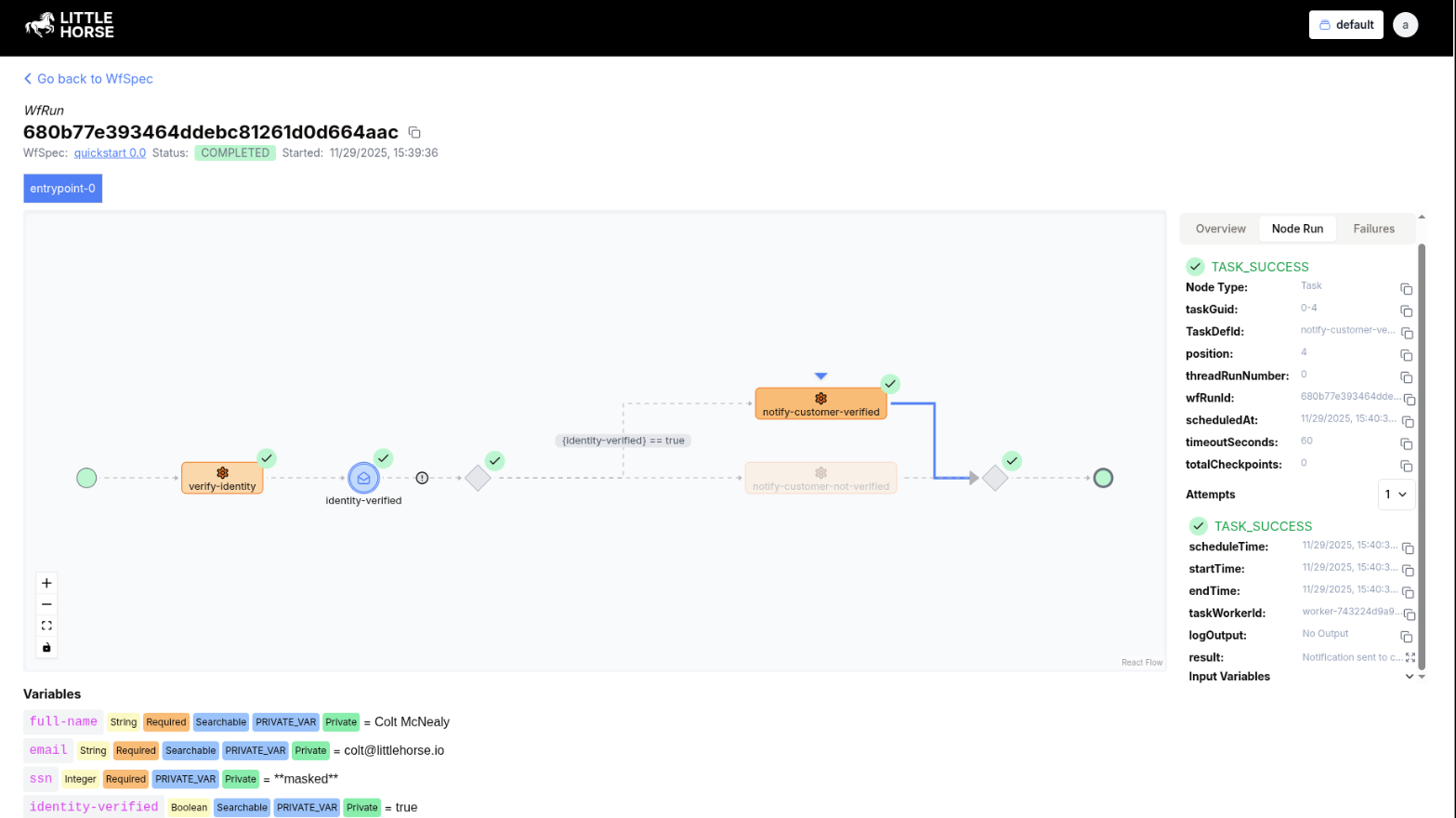
This is especially useful when you get tired of reviewing code written by agents!
Real-Time Business Insights
Because Business-as-Code engines understand the semantics of a process (rather than simply caching the bytes representing what has already happened), they can emit real-time intelligence into Apache Kafka, providing business-level metrics (eg. events when orders reach the "shipping" stage). This solves a problem that almost all microservice developers face: it's easy to inspect the health of a single service, but very difficult to analyze business processes spanning multiple services.
While Durable Execution gives you information about individual services and even technical health metrics for cross-service flows, it stops short of giving you business visibility into your processes.
Catalog Services and Business Flows
Business-as-Code is designed from first principles to have enterprise-wide modules that are easy for reuse. In Temporal, "Activities" (the equivalent of Tasks in LittleHorse) do not have a catalogued method signature, schema or contract. This is normally fine because in the majority of Temporal use-cases, Activities and the Workflows that call them are normally owned by the same team or microservice, which means that teams can easily rely on the code repo-local type signatures of the functions. However, Temporal doesn't have a centralized strongly-typed catalog of activities.
In LittleHorse, however, data types (StructDefs and primitive types) are a first-class citizen. All Task signatures are catalogued and LittleHorse does not allow the registration of a WfSpec which passes incorrect variable types into the task. This strong typing and cataloguing enables Business-as-Code to scale to much larger cross-enterprise flows. Teams within an enterprise can expose small pieces of functionality (TaskDefs), data contracts (StructDefs), or business logic modules (WfSpec)s to be consumed and used in cross-domain workflows owned by different teams.
This modularity also enables us to create a library of pre-packaged task workers. We're releasing a limited preview of this marketplace in the July release of Saddle Command Center 1.2, wherein our enterprise product will allow users to one-click deploy a pre-built Task worker with a governed contract to integrate with a set of pre-determined systems.
The Architecture
At first, Business-as-Code and Durable Execution have several surface-level similarities in terms of architecture:
- First, most Durable Execution and Business-as-Code engines have a two-tiered architecture in which workers are separate processes from the orchestration engines. This contrasts with other automation engines such as n8n, Kestra, or Airflow which favor (but are not limited to) tasks that run in the same process as the scheduler. This two-tiered architecture lends itself well to microservice orchestration and event-driven architectures.
- Secondly, both Durable Execution and Business-as-Code provide engineering teams with reliability primitives that make long-running processes durable in the face of infrastructure failures.
- Lastly, both approaches involve task queues and work scheduling. Many durable execution engines also (somewhat misleadingly) use the term "workflow" to refer to a running instance of a durable function call.
However, a closer examination reveals that Business-as-Code's more ambitious philosophy shows up in a clear architectural distinction: Durable Execution is transparent replay of function calls, and Business-as-Code is the codification and orchestration of business processes across many services.
Durable Execution is Replay
The core idea of durable execution is to give the developer the ability to write code as if infrastructure failures (network outages or server crashes) did not exist. While this seems to be a simple concept, in reality it overturns many rules that we take as "natural law" when programming. For example, without durable execution, writing microservice code that sleeps for 30 days is silly: a simple redeploy of the application would wipe out the state of many "process instances."
Durable Execution accomplishes this with two things:
- The idea of replay: after a crash, a function call is replayed from the beginning. Any side effects that already happened in the first attempt are cached and not executed twice, allowing (with some distributed-systems asterisks) idempotent, transparent restart!
- A good deal of patient cooperation and understanding by the developer.
In DE, any "workflow" (quotes are intentionally placed) is just an invocation of a function or method.
The Durable Execution Engine keeps track of every invocation of that function (and which worker it is on). When the Durable Execution Engine detects that a worker has died (or that a specific process instance has stalled and failed) it restarts the failed process instances by putting them onto a queue. Another worker will pick them up and call the same function again with the same parameters.
During the "replay" attempt, any side effect which happened on the first invocation is simply read from a cache in the Durable Execution Engine: the actual side effect action is not taken again. The goal is that the new function invocation achieves the same exact state (state meaning variables and thread stack) as the previous invocation would have been. This is the "replay" after which Temporal named their flagship conference.
In order to avoid incorrect results when a function is replayed, developers are responsible for putting all nondeterministic code or "side effects" within wrappers provided by the Durable Execution Engine's SDK.
Let's look at an example of Durable Execution implemented in Temporal:
func QuickstartWorkflow(ctx workflow.Context, fullName, email string, ssn int) error {
	verifyCtx := workflow.WithActivityOptions(ctx, workflow.ActivityOptions{
		StartToCloseTimeout: 30 * time.Second,
		RetryPolicy:         &temporal.RetryPolicy{MaximumAttempts: 4}, // 1 + 3 retries
	})
	notifyCtx := workflow.WithActivityOptions(ctx, workflow.ActivityOptions{
		StartToCloseTimeout: 30 * time.Second,
		RetryPolicy:         &temporal.RetryPolicy{MaximumAttempts: 1},
	})

	if err := workflow.ExecuteActivity(verifyCtx, VerifyIdentity, fullName, email, ssn).Get(ctx, nil); err != nil {
		return err
	}

	// WaitForEvent(...).Timeout(...): no first-class primitive, so hand-roll a
	// signal channel + timer + selector and track which one fired with a bool.
	var identityVerified bool
	gotSignal := false
	timerCtx, cancelTimer := workflow.WithCancel(ctx)
	selector := workflow.NewSelector(ctx)
	selector.AddReceive(workflow.GetSignalChannel(ctx, IDENTITY_VERIFIED_EVENT),
		func(c workflow.ReceiveChannel, _ bool) {
			c.Receive(ctx, &identityVerified)
			gotSignal = true
			cancelTimer()
		})
	selector.AddFuture(workflow.NewTimer(timerCtx, 5*time.Minute), func(workflow.Future) {})
	selector.Select(ctx)

	// HandleError(..., Timeout, ...): the timeout is not an error here, just the
	// branch that didn't set gotSignal, so we reconstruct it manually.
	if !gotSignal {
		_ = workflow.ExecuteActivity(notifyCtx, NotifyCustomerNotVerified, fullName, email).Get(ctx, nil)
		return temporal.NewApplicationError("Unable to verify customer identity in time.", "customer-not-verified")
	}

	if identityVerified {
		return workflow.ExecuteActivity(notifyCtx, NotifyCustomerVerified, fullName, email).Get(ctx, nil)
	} else {
		return workflow.ExecuteActivity(notifyCtx, NotifyCustomerNotVerified, fullName, email).Get(ctx, nil)
	}
}
In Temporal, every time you invoke the quickstart workflow, the happy-path flow is as follows:
- Temporal puts the
quickstartworkflow on a workflow queue. - A workflow worker polls the Temporal server and sees the task to run the
QuickstartWorkflow. The Temporal SDK calls the function. - When the
ExecuteActivity()line is reached for the "verify identity" task, the Temporal SDK in the workflow worker tells the Temporal Server to schedule the "verify identity" activity. The thread (in this case, goroutine) executing theQuickstartWorkflowstops and hangs waiting for the result of the Activity. - Temporal schedules the "verify identity" task onto a task queue.
- An Activity Worker picks up and executes the "verify identity" task by calling a normal Go function, and reports the result back to the Temporal server.
- The Temporal Server sends that result to the waiting thread on the workflow worker, which unblocks it and resumes workflow execution.
The same dance continues for blocking steps, such as waiting for a Signal. However, things get interesting when replay happens: what if the workflow worker crashes? Or the workflow thread blocks too long and needs to be evicted by the SDK? In this case, Temporal will replay the function's execuution from the beginning:
- Another workflow task is put on the
quickstartworkflow queue. - Another workflow worker picks up the task and invokes the
QuickstartWorkflow. - The call to
workflow.ExecuteActivity()does not actually schedule an Activity but rather fetches the result of the previous execution, and returns it. - The
QuickstartWorkflowfunction continues as before.
You can see how important it is to put nondeterministic logic, or any logic with side effects, inside an Activity!
Business-as-Code is Workflow
In LittleHorse, the above workflow looks just like this:
const (
	WORKFLOW_NAME                     = "quickstart"
	IDENTITY_VERIFIED_EVENT           = "identity-verified"
	VERIFY_IDENTITY_TASK              = "verify-identity"
	NOTIFY_CUSTOMER_VERIFIED_TASK     = "notify-customer-verified"
	NOTIFY_CUSTOMER_NOT_VERIFIED_TASK = "notify-customer-not-verified"
)

func QuickstartWorkflow(wf *littlehorse.WorkflowThread) {
	fullName := wf.DeclareStr("full-name").Searchable().Required()
	email := wf.DeclareStr("email").Searchable().Required()
	ssn := wf.DeclareInt("ssn").MaskedValue().Required()
	identityVerified := wf.DeclareBool("identity-verified").Searchable()

	wf.Execute(VERIFY_IDENTITY_TASK, fullName, email, ssn).WithRetries(3)

	identityVerificationResult := wf.WaitForEvent(IDENTITY_VERIFIED_EVENT).
		Timeout(60 * 5).
		SetCorrelationId(email)

	exceptionName := littlehorse.Timeout
	wf.HandleError(identityVerificationResult, &exceptionName, func(handler *littlehorse.WorkflowThread) {
		handler.Execute(NOTIFY_CUSTOMER_NOT_VERIFIED_TASK, fullName, email)
		message := "Unable to verify customer identity in time."
		handler.Fail(nil, "customer-not-verified", &message)
	})

	identityVerified.Assign(identityVerificationResult)

	wf.DoIfElse(
		identityVerified.IsEqualTo(true),
		func(ifBody *littlehorse.WorkflowThread) {
			ifBody.Execute(NOTIFY_CUSTOMER_VERIFIED_TASK, fullName, email)
		},
		func(elseBody *littlehorse.WorkflowThread) {
			elseBody.Execute(NOTIFY_CUSTOMER_NOT_VERIFIED_TASK, fullName, email)
		},
	)
}
The code above in LittleHorse is then compiled into the WfSpec that we saw visualized on the LittleHorse Dashboard earlier in this article.
We can first see that all of the actions and control flow of the LittleHorse WfSpec are done through the wf struct (a littlehorse.WorkflowThread). This is because the QuickstartWorkflow function is used not to execute a workflow instance but rather to build a directed graph of computation, mapping out what the workflow should do every time we run it.
Whereas the QuickstartWorkflow function in Temporal is invoked every time a "workflow" is run, the QuickstartWorkflow in LittleHorse is only run one time: to compile the computational graph (the WfSpec). Every time you tell LittleHorse to execute a workflow, it doesn't call QuickstartWorkflow() but rather schedules tasks according to the specification in the WfSpec.
Every time a workflow is run, LittleHorse creates a record (specifically, a WfRun) in its data store to keep track of the execution. It consults the WfSpec graph to determine what tasks to execute and when. Every time a task is updated (scheduled, started, completed, etc), LittleHorse looks up the relevant WfRun and updates its state. The biggest thing that LittleHorse and Temporal have in common architecturally is a task queue, everything else is actually very different!
If you study compilers and squint hard enough, you will notice that a LittleHorse WfSpec is quite similar to an abstract syntax tree.
This might be a little bit too philosophical for a piece about Durable Execution, but could this mean that a WfSpec built by a GUI is still code? I would say it is! This is because the compiled WfSpec is almost analogous to machine code, and it can still be version controlled after all!
Doesn't LittleHorse Also Have Durable Execution?
Advanced users will note that LittleHorse natively has a lightweight durable execution capability such that, within a TaskRun, a Task Worker can cache side effects in order to reduce duplicated processing (note: we have additional ways to handle idempotency, including creating an idempotency key for each TaskRun which can be safely propagated to downstream systems).
The Checkpoint feature in the Task Worker SDK is intentionally minimalistic relative to other durable execution engines. This is because many other features, such as sleeping or waiting for callbacks from external systems, are best put at the WfSpec level. Generally, anytime a process sleeps for minutes or longer, that "quiet period" is relevant to the business and as such should be surfaced at the WfSpec level.
In short, we believe that durability is a commodity in 2026 and that Durable Execution has its place as part of a larger platform! That's why we built it conveniently within the Task Worker's execution context inside LittleHorse.
You can see an example of checkpointed tasks on GitHub.
Developer Considerations
Let's take a deeper dive!
Workflow Workers vs Activity Workers
First, it's worth noting that Temporal has two types of workers: Workflow Workers and Activity Workers. The Workflow Workers poll on a "workflow task queue" and run the QuickstartWorkflow function every time a Temporal client tells Temporal to run the workflow. Activity Workers poll on an "activity task queue" and execute an individual activity function once a Workflow Execution tells them to do so by calling workflow.ExecuteActivity(). The thread on the Workflow Worker blocks until the response comes back through the Temporal cluster.
In contrast, LittleHorse has only one type of worker: just a Task Worker, which executes a Task every time the LittleHorse Server tells it to. This is because the actual scheduling of the workflow happens inside the LittleHorse Server rather than the Workflow Worker (as it is in Temporal). LittleHorse does not have Workflow Workers.
Business-Level Code
Secondly, LittleHorse has higher level primitives allowing the WfSpec to act at the business level. For example, LittleHorse has built-in .withCorrelationId() capabilities to correlate events to individual Workflow Runs (WfRuns). Temporal requires users to persist a mapping table in order to send a Signal to running workflows. Not pictured in this workflow are native human-in-the-loop integrations or our open-source User Tasks Bridge OIDC-compatible task manager.
The Dangers of Determinism
The Temporal QuickstartWorkflow is just code, and it is executed every time the workflow is run. On one hand, that makes it easy to get started with Temporal (but it's not hard to get started with LittleHorse, either!). On the other hand, any nondeterministic code that slips into the QuickstartWorkflow function will cause severe headaches: if a workflow execution migrates to another worker, the workflow execution will compute incorrect results (and fail), and there will be no visual graph showing the path that it took. This replay concept also makes versioning of workflows complicated: whereas in LittleHorse you can run multiple versions of a WfSpec in parallel, in Temporal you need to implement tricky versioning practices when migrating long-running workflows.
What We Mean by Just Code
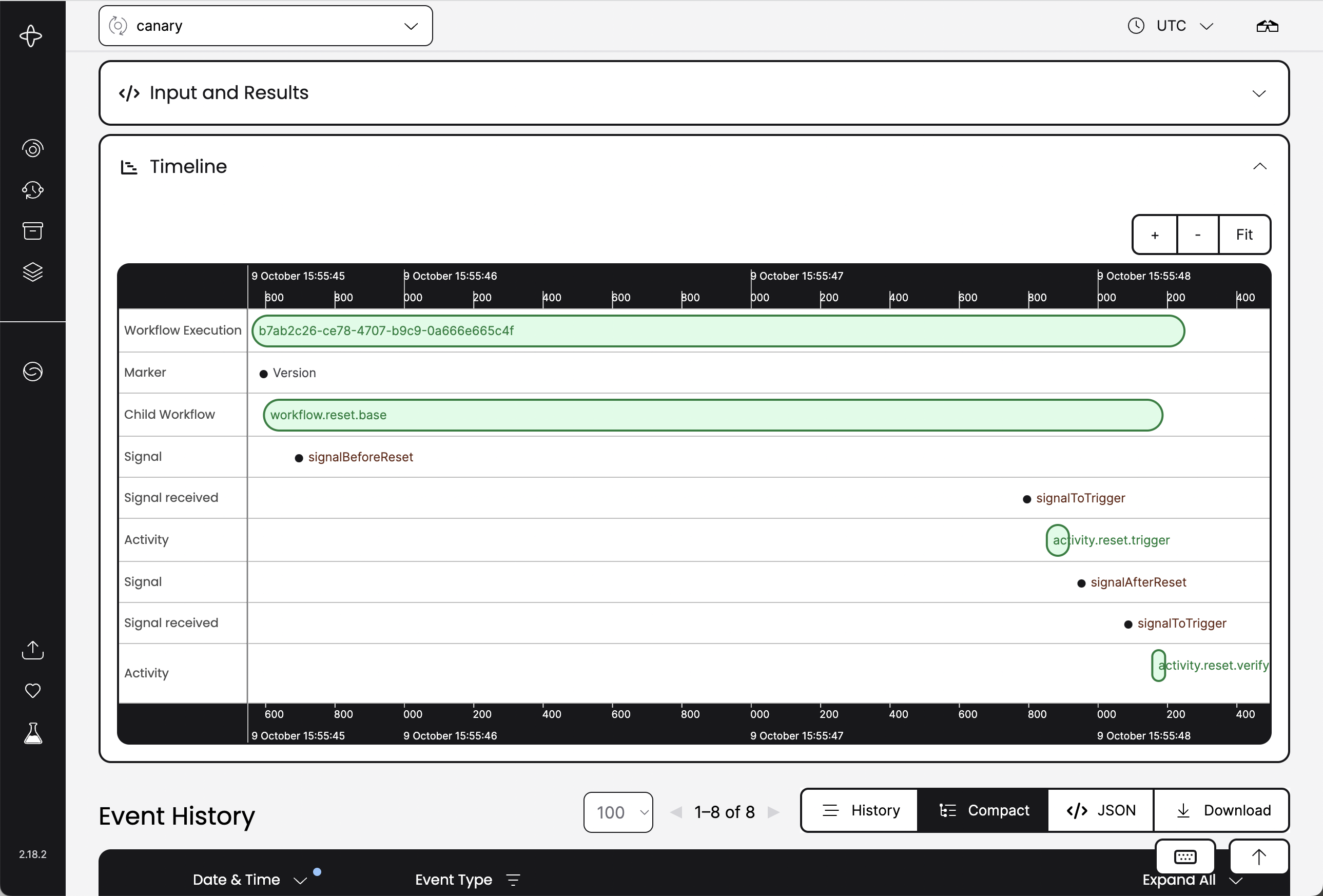
Lastly, notice that everything in Temporal is code-level, not business-level. Even the timeouts in LittleHorse are explicitly modeled at the business level, with the exception handler thread visible and auditable on the dashboard. In contrast, Temporal's dashboard shows the inputs and ouptuts of Activities that already happened, but doesn't show the larger picture of the business flow:
What Business-as-Code Enables
Because Business-as-Code engines understand and control the processes that they orchestrate (rather than just caching side effects), Business-as-Code platforms can offer far more capabilities than pure Durable Execution platforms. This month, we will release version 1.2 of the Saddle Command Center platform which takes Business-as-Code to the next level with features not available in Durable Execution platforms.
What Durable Execution Can't Do
First, the Saddle Command Center allows users to codify their processes through code (Java, Go, Python, C#, JavaScript coming soon) or through Yaml generated by a visual workflow editor GUI. This furthers alignment of business users and engineers in a single platform: not every process needs code, but every process should be codified and version controlled!
Next, the Saddle Command Center contains StreamSense, a streaming engine based on Apache Kafka with bidirectional integrations to the core LittleHorse Server:
- Sources which convert workflow data into real-time streams
- Triggers which trigger workflows
To get data into and out of StreamSense, we introduce LittleHorse Connect, which is a suite of connectors to sink streams into external systems and also to create streams from external systems. Saddle 1.2 includes webhook source connectors; future releases will include sinks and polling sources based on Apache Kafka Connect.
One interesting upcoming feature of StreamSense is the ability to transform a WfSpec into a stream of events in real-time. For example, internal prototypes already support getting events like the following into StreamSense with no code change from the above workflow:
{
	"id": "02538skjs38sge213k",
	"status": "COMPLETED",
	"variables": {
		"ssn": "*****",
		"email": "obiwan@jedi.temple",
		"full-name": "Obi-Wan Kenobi",
		"identity-verified": true
	}
}
Lastly, the LittleHorse Runtime enables the deployment of pre-built tasks that connect to commonly-used systems, such as Stripe and DocuSign.
The Business-as-Code approach also enables other features (not yet implemented), including:
- Declaratively build agents for the Decision Worker Pattern.
- Pre-built stream processors and business dashboards to process streams of events and detect anomalies or extract insights in real-time.
- A deployment platform allowing you to build and run end-to-end applications inside the Saddle Command Center.
- The ability to catalog and connect to external API's, interacting with endpoints as a Task in a workflow.
Saddle features will have integrations with Infrastructure-as-Code, and will be interactive via either a GUI or an API, true to the nature of Business-as-Code. As you can see, the core orchestration engine lays the foundation for a much more ambitious, end-to-end Business-as-Code platform that goes far beyond what Durable Execution can provide! With Business-as-Code, any workflow--from back-office automation to core online product flows--can be orchestrated and governed in a single platform.
What Classic Workflow Can't Do
While this post focused mainly on Durable Execution, it's worth noting that Business-as-Code is not just a fancy name for workflow.
LittleHorse is unlike any other workflow engine in that it made code a first-class citizen. BPMN providers such as Camunda added their Java SDK's as an afterthought; it is difficult to do any real development except through their GUI. In contrast, LittleHorse's WfSpec language was designed to mimic coding languages as closely as possible. If you squint hard enough, the WfSpec has everything that a programming language might have: threads, variables, conditionals, exception handlers, interrupts, function calls, and child processes.
This developer-first ethos accelerates development of workflows with LittleHorse, making it easier for engineers and coding agents alike to build WfSpecs compared to visual-only GUI-based workflow builders.
Wrapping Up
Before I started LittleHorse (and with it, the idea of Business-as-Code), I studied Durable Execution in an effort to build something closer to what drives business value: actual business workflows. My father's open-source ethos stuck with me, which is why the LittleHorse Server--the core of our Business-as-Code platform--is open-source. Some ways you can get started:
- Check out the LittleHorse Server on GitHub, run the quickstart, and if you like it, leave a star!
- Join us on Slack
- Follow us on YouTube