Executive POV: Have Your Claw and Eat It Too?

Among leaders and executives, there has been much recent buzz about OpenClaw in the context of enterprise automation. While Claws do give us a glimpse of what Agents can do, there are fundamental limitations to the Claw architecture when used as process orchestrators. Thankfully, there is a safer, cheaper, and more predictable way to automate processes with Agents. (And no, LittleHorse is not a competitor with Claws...as we will see in this post, LittleHorse focuses on enterprise process orchestration while Claws fit best as powerful personal assistants).
This is the second part in a three-part series about our Business-as-Code Approach.
- Tech POV: Business-as-Code
- [This Post] Executive POV: Have Your Claw and Eat it Too With Business-as-Code
- Executive POV: Business-as-Code to Codify, Agentify, and Optimize Processes
In this post, we will:
- Understand exactly how Agents and Claws work (it's not scary, I promise!).
- Examine why Claws make for great assistants but are not built for automation of enterprise processes.
- Discuss how Business-as-Code presents a safer, cheaper, and more predictable way to orchestrate critical business flows using Agents.
While I often write specifically for engineers, this post focuses more on business-level challenges and should be relevant to both engineers and executives alike.
Understanding Claws
To understand how the Claw architecture works at a high level, we will take a scenic (but still pleasant and relaxing!) route:
- What even is an Agent? (How does it work?)
- How do Claws Work?
- What's the deal with NemoClaw?
If you've been hands-on with agents for a while and understand the internals of a Claw, you can skip ahead. The following section assumes no technical background.
I'll write a technical deep dive on gradient descent, LLM's, and agent internals once I finish the Agentic Patterns series.
Agent Basics
At the risk of oversimplifying one of the most impactful inventions of the 21st century, an agent is simply a computer program that calls an LLM repeatedly in a fancy loop.
The program (sometimes called an "Agent Harness") first defines a set of tools that the LLM can use. For example, tools might allow the LLM to perform such actions as "search the web," "run a bash (terminal) command," or "read the contents of this file on my laptop." Once the tools are defined, the program then:
- Passes the user's input (prompt) into an LLM and asks the LLM what tool to call.
- Reads the output from the LLM, and takes the action specified by the LLM.
- Pastes the result of taking the action back into the LLM.
- Repeats steps
1through3until the LLM says "I'm done!"
The key insight is that step 2 gives the LLM access to interact with the outside world through tools. This is the source of many security vulnerabilities: the most infamous one is "prompt injection," in which a malicious prompt tricks the LLM into calling a tool with parameters that cause a data leak or which cause inappropriate actions to take place.
The Toolformer Paper from 2023 is a good read to deep dive into exactly what's going on in step 2!
The Claw Insight
A Claw is a thin (but extremely powerful) layer on top of an Agent that, in most cases, runs locally on your very own laptop. The Claw architecture utilizes three key insights (or are they tricks?):
- The tools provided to the agent in a Claw allow it to do anything it wants on the computer, even accessing and using a browser through the Browser MCP. This unleashes the Agent into the world, allowing it to do pretty much anything a human can do with a computer.
- The agent inside the Claw can "remember" things by writing them down to local files on the computer it runs on. This allows the Claw to create tasks for itself to do in the future.
- The Claw harness runs the agent on an interval to process old tasks, such as periodically monitoring the stock market, looking for new GitHub issues to fix, etc.
Lastly, a tiny amount of plumbing code allows users to prompt their agent through chat interfaces like WhatsApp, turning a Claw into a full-blown digital assistant. In fact, the Claw architecture is so elegant and simple that it can be implemented in just 500 lines of code (see: The NanoClaw Project) on top of a coding agent such as OpenCode.
As we'll see shortly, the danger with the Claw architecture is how free-wheeling it is. Processes aren't coded anywhere: the behavior of the Claw is entirely up to the probabilistic (which means definitely eventually wrong) LLM and the non-binding instructions (or pleas?) that you give the Claw.
What About NemoClaw?
NVidia recently released NemoClaw, which builds security on top of OpenClaw. NemoClaw is NVidia's enterprise stack for running OpenClaw, allowing you to install and run a Claw in an isolated sandbox (you can think of this as a virtual machine). NemoClaw also has the handy ability to run on cloud hardware, solving the problem wherein closing your laptop stops your agent from making progress.
While NemoClaw does allow you to mitigate a lot of the security implications of running Claws in the enterprise, the project still does not turn the agent into a reliable, auditable, and efficient orchestrator. As we'll see in the next section, NemoClaw is a useful assistant but is not a panacea for enterprise automation.
In short, NemoClaw removes some of the security considerations that OpenClaw has as a personal assistant but does not transform the Claw architecture into an enterprise process orchestrator.
Where Do Claws Fit?
The Claw architecture is effective and elegantly simple: coding agent harnesses such as Claude Code and OpenCode can use a computer in ways similar to a human, enabling the Claw to accept instructions in natural language.
That simplicity comes at a cost in governance, predictability, and token spend. For mission-critical business flows, we want the agent to participate in the process, not invent the process.
Effective Assistants
OpenClaw (the most famous Claw!) cut its teeth with personal assistant tasks such as:
- Check the git history from the last week and suggest documentation updates.
- Summarize the sales pipeline before a staff meeting.
- Look at my upcoming meetings tomorrow and prepare a report for each one, including who I'm meeting with (check LinkedIn) and any past interactions I've had with them (including email).
For such tasks, the Claw architecture is highly effective and elegantly simple: coding agent harnesses such as Claude Code and OpenCode can perform these tasks simply by using bash commands and the Browser (through MCP). Handy interfaces (such as WhatsApp or Signal chats) make interacting with the Claw truly feel like a live personal assistant.
Claws Are Irresponsible Process Orchestrators
The Claw-style loop which wakes an agent on a schedule and lets it do something on a computer is great for building an assistant that can solve open-ended personal automation tasks. However, this architecture is definitively unfit for enterprise process orchestration for critical processes such as:
- Approving a loan.
- Issuing a refund.
- Modifying a customer's subscription.
- Triggering a compliance review.
- Updating a payment method.
First, a system built on top of natural language instructions parsed by a non-deterministic computer program will never hold up under real-world edge cases such as prompt injection attacks, much less a regulatory audit. Details such as authorization, specific business logic, and when to involve human judgment should be codified rather than left to a probabilistic LLM.
Secondly, the Claw architecture is extraordinarily expensive. Token costs can easily exceed hundreds of dollars per day per person, wiping away any efficiency gains. This is because lack of structure forces the agent to spend tokens figuring out what needs to be done, injecting creativity in places where it is potentially unwanted (and weighing down the wallet).
Lastly, in addition to the challenges of using a Claw to automate back-office processes, OpenClaw's own security docs caution against deploying a Claw in a multi-tenant environment. Rather, users are advised to deploy a single Claw per human user of them in a true assistant-style deployment.
Predictably Intelligent Automation
Claws spend tokens to figure out what to do. While this is great for open-ended, assistant-style tasks, this architecture is not suitable for business-critical workflow automation. In such cases with well-defined, sensitive processes, Claws are both expensive and error-prone due to the fact that processes are not codified but rather inferred in real-time by the LLM.
If Claws aren't the answer, how can we take advantage of the transformational power of Agents? Simply put, codify the parts of your process that you know must happen and use agents to route individual cases within the larger process. That's what I've been writing about in the Agentic Patterns series, and that is exactly what Business-as-Code excels at.
For business process automation, Business-as-Code gives you a safer and more predictable way to deploy Agents without blowing your budget.
Business-as-Code
The core premise of Business-as-Code is that you (or Claude) write high-level code which specifies what is supposed to happen (and when) in your business process. These actions take place across myriad systems: microservices, external SaaS platforms, agents, and legacy systems such as mainframes.
Crucially, as much as possible of the process is codified in deterministic code: Agents are only responsible for making routing decisions within a larger process, such as classifying a refund request as valid or fraudulent in the context of a user's past interactions. The Agents do not have the capability to reinvent the order return process: that was already codified, reviewed, and accepeted in deterministic Java / Python / Go / C# code which matches your business process and is visualized in the LittleHorse Dashboard (as below):
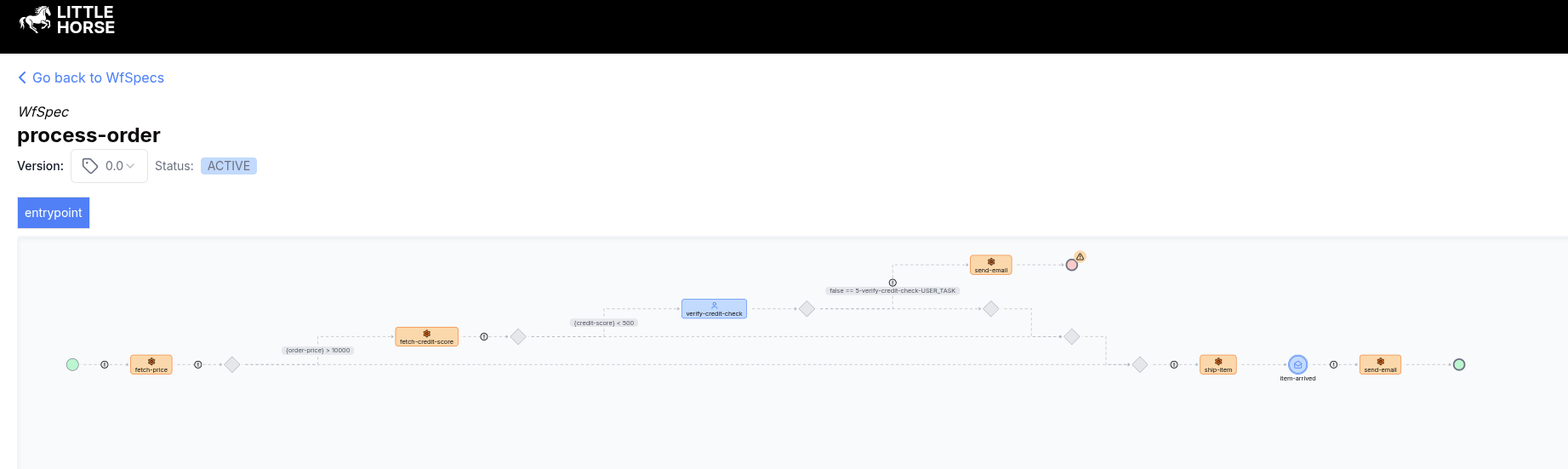
When you use a Claw to automate enterprise processes, you'll repeatedly pay for tokens used to figure out steps that should have been deterministically codified to save costs and reduce errors. Business-as-Code lets you have your Agent and eat it too: you can reap the benefits of agentic intelligence, save money, and build processes that never break down.
In short, if you haven't codified your process with Business-as-Code, the Agent will invent one for you.