Correlated Events
When using External Events, the caller must know the WfRunId of the workflow they want to signal. But what if you don't know the WfRunId? What if all you have is some external identifier—like a DocuSign document ID or a Stripe payment ID—and you want to signal whichever WfRun is waiting for that identifier?
That's exactly what CorrelatedEvents solve. Instead of posting an ExternalEvent directly to a WfRunId, you post a CorrelatedEvent with a correlation key, and LittleHorse automatically routes it to any WfRun that is waiting for an event with that same key.
Common use-cases for CorrelatedEvents include:
- A DocuSign webhook fires when a document is signed—you know the document ID but not the
WfRunId. - A Stripe webhook fires when a payment succeeds—you know the payment intent ID but not the
WfRunId. - A third-party system completes an async operation and calls back with its own internal ID.
- You want a single external event to be delivered to multiple
WfRuns that share the same correlation key.
Concepts
When working with Correlated Events, you need to understand three API objects:
ExternalEventDef: metadata that defines a type of External Event. To use correlated events, theExternalEventDefmust include aCorrelatedEventConfig.CorrelatedEvent: a piece of data posted into LittleHorse that is not yet associated with any specificWfRun. It is a precursor to one or moreExternalEvents.ExternalEvent: the actual event delivered to aWfRun. LittleHorse createsExternalEvents automatically when aCorrelatedEventmatches a waitingWfRun.
How It Works
The flow for correlated events is:
- In your
WfSpec, you callwaitForEvent()with a correlation ID (a variable whose value is determined at runtime). - When a
WfRunreaches that node, LittleHorse registers a correlation marker using the value of that variable as the correlation key. - Someone (your webhook handler, a microservice, a Kafka Connector, etc.) posts a
CorrelatedEventwith a matching key. - LittleHorse matches the
CorrelatedEventto the waitingWfRun, creates anExternalEvent, and the workflow continues.
If the CorrelatedEvent is posted before the WfRun reaches the ExternalEventNode, LittleHorse will still match it when the WfRun arrives at that node. The ordering doesn't matter.
ExternalEvent vs CorrelatedEvent
ExternalEvent | CorrelatedEvent | |
|---|---|---|
| Caller needs to know | The WfRunId | Only the correlation key |
| Targets | Exactly one WfRun | Any WfRun(s) waiting for that key |
| Posted via | rpc PutExternalEvent | rpc PutCorrelatedEvent |
Can signal multiple WfRuns | No | Yes (unless deleteAfterFirstCorrelation is set) |
CorrelatedEventConfig
When registering an ExternalEventDef that supports correlated events, you must provide a CorrelatedEventConfig. This configuration controls:
deleteAfterFirstCorrelation: Iftrue, theCorrelatedEventis deleted after it matches with oneWfRun. This also implies that only oneWfRuncan ever be correlated to this event. This is useful for one-to-one scenarios like "wait for this specific document to be signed."ttlSeconds(optional): If set,CorrelatedEvents are automatically cleaned up after the specified time-to-live.
In Practice
- Run the TypeScript example.
- Run the Java example.
- Run the Go example.
- Run the Python example.
- Run the C# example.
To use Correlated Events in your workflows, you need to:
- Create an
ExternalEventDefwith aCorrelatedEventConfig. - Create a
WfSpecthat waits for an event using a correlation ID. - Run the
WfSpecand pass in the correlation key as a variable. - Post a
CorrelatedEventwith the matching key to complete the workflow.
For the sake of simplicity, every code sample in this document can be compiled and run on its own as a single file. You can even mix-and-match between different languages—try doing one step in Java and another in Python!
If you do want to follow along with the code here, we recommend checking out our installation docs to:
- Install
lhctl. - Set up a LittleHorse Kernel for local development.
- Add the dependency for your SDK of choice.
Write the Workflow
In this section, we will create a TaskDef and a WfSpec (which will also register the ExternalEventDef with correlated event support). The example we will build is a workflow in which:
- The workflow takes a
document-idas input. - It waits for an
ExternalEventof typedocument-signedusing thedocument-idas the correlation key. - When the event arrives, it passes the document ID and the signer name (from the event payload) to a
processSignedDocumenttask, which simulates processing the signed document.
Background: The TaskDef
Let's use a TaskDef called processSignedDocument, which takes a document ID and signer name, and simulates processing the signed document. This could represent updating a database, sending a notification, or any other business logic you want to perform when a document is signed. Run the following code in a terminal to register the TaskDef and run your Task Worker. Keep it running for the duration of this exercise so that the worker can execute TaskRuns once you run your WfRun.
- Java
- Python
- Go
- TypeScript
- C#
package io.littlehorse.quickstart;

import io.littlehorse.sdk.common.config.LHConfig;
import io.littlehorse.sdk.worker.LHTaskMethod;
import io.littlehorse.sdk.worker.LHTaskWorker;


class DocumentProcessor {
  @LHTaskMethod("processSignedDocument")
  public String processSignedDocument(String documentId, String signerName) {
    String result = "Document " + documentId + " was signed by " + signerName + ". Processing complete.";
    System.out.println(result);
    return result;
  }
}

public class Main {

    public static void main(String[] args) {
        LHConfig config = new LHConfig();

        LHTaskWorker worker = new LHTaskWorker(new DocumentProcessor(), "processSignedDocument", config);
        Runtime.getRuntime().addShutdownHook(new Thread(worker::close));

        worker.registerTaskDef();
        worker.start();
    }
}
import asyncio
import littlehorse
from littlehorse import create_task_def
from littlehorse.worker import LHTaskWorker
from littlehorse.config import LHConfig

config = LHConfig()

async def process_signed_document(document_id: str, signer_name: str) -> str:
  result = f"Document {document_id} was signed by {signer_name}. Processing complete."
  print(result)
  return result

async def main():
  worker = LHTaskWorker(process_signed_document, "processSignedDocument", config)
  await littlehorse.start(worker)

if __name__ == "__main__":
  create_task_def(process_signed_document, "processSignedDocument", config)
  asyncio.run(main())
package main

import (
    "fmt"
    "github.com/littlehorse-enterprises/littlehorse/sdk-go/littlehorse"
)


func ProcessSignedDocument(documentId string, signerName string) string {
  result := fmt.Sprintf("Document %s was signed by %s. Processing complete.", documentId, signerName)
  fmt.Println(result)
  return result
}

func main() {
    config := littlehorse.NewConfigFromEnv()
    worker, _ := littlehorse.NewTaskWorker(config, ProcessSignedDocument, "processSignedDocument")
    worker.RegisterTaskDef()
    worker.Start()
}
import { createTaskWorker, LHConfig } from "littlehorse-client";
import { z } from "zod";

function processSignedDocument(documentId: string, signerName: string): string {
  const result = `Document ${documentId} was signed by ${signerName}. Processing complete.`;
  console.log(result);
  return result;
}

const config = LHConfig.from({});
const worker = createTaskWorker(
  processSignedDocument,
  "processSignedDocument",
  config,
  {
    inputVars: { documentId: z.string(), signerName: z.string() },
    outputSchema: z.string(),
  },
);

process.on("SIGINT", () => void worker.close());
process.on("SIGTERM", () => void worker.close());

await worker.registerTaskDef();
await worker.start();
using LittleHorse.Sdk;
using LittleHorse.Sdk.Worker;

namespace Quickstart;


class DocumentProcessor
{
  [LHTaskMethod("processSignedDocument")]
  public string ProcessSignedDocument(string documentId, string signerName)
  {
    string result = $"Document {documentId} was signed by {signerName}. Processing complete.";
    Console.WriteLine(result);
    return result;
  }
}

public class Program
{
    static void Main(string[] args)
    {
        var config = new LHConfig();
        var worker = new LHTaskWorker<DocumentProcessor>(new DocumentProcessor(), "processSignedDocument", config);
        worker.RegisterTaskDef();
        AppDomain.CurrentDomain.ProcessExit += (sender, e) => { worker.Close(); };
        worker.Start();
    }
}
Registering the WfSpec
Now let's register the WfSpec. There are three key differences from a regular ExternalEvent workflow:
.withCorrelationId()tells LittleHorse to use the value of a variable as the correlation key..withCorrelatedEventConfig()configures how correlation behaves (e.g., whether to delete after the first match)..registeredAs()tells LittleHorse to automatically register theExternalEventDef(with theCorrelatedEventConfig) when theWfSpecis registered—no separate registration step needed.
- Java
- Python
- Go
- TypeScript
- C#
package io.littlehorse.quickstart;

import io.littlehorse.sdk.common.config.LHConfig;
import io.littlehorse.sdk.common.proto.CorrelatedEventConfig;
import io.littlehorse.sdk.wfsdk.WfRunVariable;
import io.littlehorse.sdk.wfsdk.Workflow;

public class Main {

    public static final String EVENT_NAME = "document-signed";

    public static void main(String[] args) {
        LHConfig config = new LHConfig();

        Workflow workflow = Workflow.newWorkflow("correlated-event-example", wf -> {
            // Declare a variable for the correlation key
            WfRunVariable documentId = wf.declareStr("document-id");

            // Wait for the correlated event and get the signer name
            var signerName = wf.waitForEvent(EVENT_NAME)
              .withCorrelationId(documentId)
              .withCorrelatedEventConfig(CorrelatedEventConfig.newBuilder()
                .setDeleteAfterFirstCorrelation(true)
                .build())
              .registeredAs(String.class);

            // Call the task with both documentId and signer name
            wf.execute("processSignedDocument", documentId, signerName);
        });

        workflow.registerWfSpec(config.getBlockingStub());
    }
}
from littlehorse.workflow import Workflow, WorkflowThread
from littlehorse import create_workflow_spec
from littlehorse.config import LHConfig
from littlehorse.model import CorrelatedEventConfig

EVENT_NAME = "document-signed"

def get_workflow() -> Workflow:

    def wf_logic(wf: WorkflowThread) -> None:
      # Declare a variable for the correlation key
      document_id = wf.declare_str("document-id")

      # Wait for the correlated event and get the signer name
      signer_name = wf.wait_for_event(
        EVENT_NAME,
        correlation_id=document_id,
        correlated_event_config=CorrelatedEventConfig(
          delete_after_first_correlation=True,
        ),
        return_type=str,
      )

      # Call the task with both document_id and signer_name
      wf.execute("processSignedDocument", document_id, signer_name)

    return Workflow("correlated-event-example", wf_logic)

if __name__ == "__main__":
    config = LHConfig()
    create_workflow_spec(get_workflow(), config)
package main

import (
    "context"
    "log"
    "github.com/littlehorse-enterprises/littlehorse/sdk-go/lhproto"
    "github.com/littlehorse-enterprises/littlehorse/sdk-go/littlehorse"
)

const EventName = "document-signed"

func WfLogic(wf *littlehorse.WorkflowThread) {
  // Declare a variable for the correlation key
  documentId := wf.DeclareStr("document-id")

  // Wait for the correlated event and get the signer name
  signerName := wf.WaitForEvent(EventName).
    SetCorrelationId(documentId).
    WithCorrelatedEventConfig(&lhproto.CorrelatedEventConfig{
      DeleteAfterFirstCorrelation: true,
    }).
    RegisteredAs(lhproto.VariableType_STR)

  // Call the task with both documentId and signerName
  wf.Execute("processSignedDocument", documentId, signerName)
}

func main() {
    config := littlehorse.NewConfigFromEnv()
    client, _ := config.GetGrpcClient()

    wf := littlehorse.NewWorkflow(WfLogic, "correlated-event-example")

    putWfSpecReq, _ := wf.Compile()
    _, err := (*client).PutWfSpec(context.Background(), putWfSpecReq)
    if err != nil {
        log.Fatal(err)
    }
}
import { LHConfig, Workflow } from "littlehorse-client";
import { z } from "zod";

const config = LHConfig.from({});

const workflow = Workflow.newWorkflow("correlated-event-example", (wf) => {
  const documentId = wf.declareStr("document-id");

  const signerName = wf.waitForEvent("document-signed", {
    correlationId: documentId,
    correlatedEventConfig: { deleteAfterFirstCorrelation: true },
    payloadSchema: z.string(),
  });

  wf.execute("processSignedDocument", documentId, signerName);
});

await workflow.registerWfSpec(config);
using LittleHorse.Sdk;
using LittleHorse.Sdk.Common.Proto;
using LittleHorse.Sdk.Workflow.Spec;

namespace Quickstart;

public class Program
{
    public static void WfLogic(WorkflowThread wf)
    {
      // Declare a variable for the correlation key
      WfRunVariable documentId = wf.DeclareStr("document-id");

      // Wait for the correlated event and get the signer name
      var signerName = wf.WaitForEvent("document-signed")
        .WithCorrelationId(documentId)
        .WithCorrelatedEventConfig(new CorrelatedEventConfig
        {
          DeleteAfterFirstCorrelation = true,
        })
        .RegisteredAs(typeof(string));

      // Call the task with both documentId and signerName
      wf.Execute("processSignedDocument", documentId, signerName);
    }

    static void Main(string[] args)
    {
        var config = new LHConfig();
        var workflow = new Workflow("correlated-event-example", WfLogic);
        workflow.RegisterWfSpec(config.GetGrpcClientInstance());
    }
}
There are three key calls here:
.withCorrelationId(documentId)(orSetCorrelationId/correlation_id=depending on your language) tells LittleHorse: "when thisWfRunreaches this node, register a correlation marker using the runtime value ofdocumentId.".withCorrelatedEventConfig(...)configures correlation behavior—here,deleteAfterFirstCorrelationmeans eachCorrelatedEventis consumed after it matches with oneWfRun..registeredAs(String.class)(orRegisteredAs/return_type=depending on your language) tells LittleHorse to automatically register theExternalEventDef(including theCorrelatedEventConfig) when theWfSpecis registered. No separatePutExternalEventDefcall is needed!
Run the Workflow
Now that we've registered our TaskDef and WfSpec (which also registered the ExternalEventDef), let's run the workflow and complete it with a CorrelatedEvent.
Start a WfRun
Start the WfRun using lhctl, passing in the document-id variable:
lhctl run correlated-event-example document-id my-document-abc123
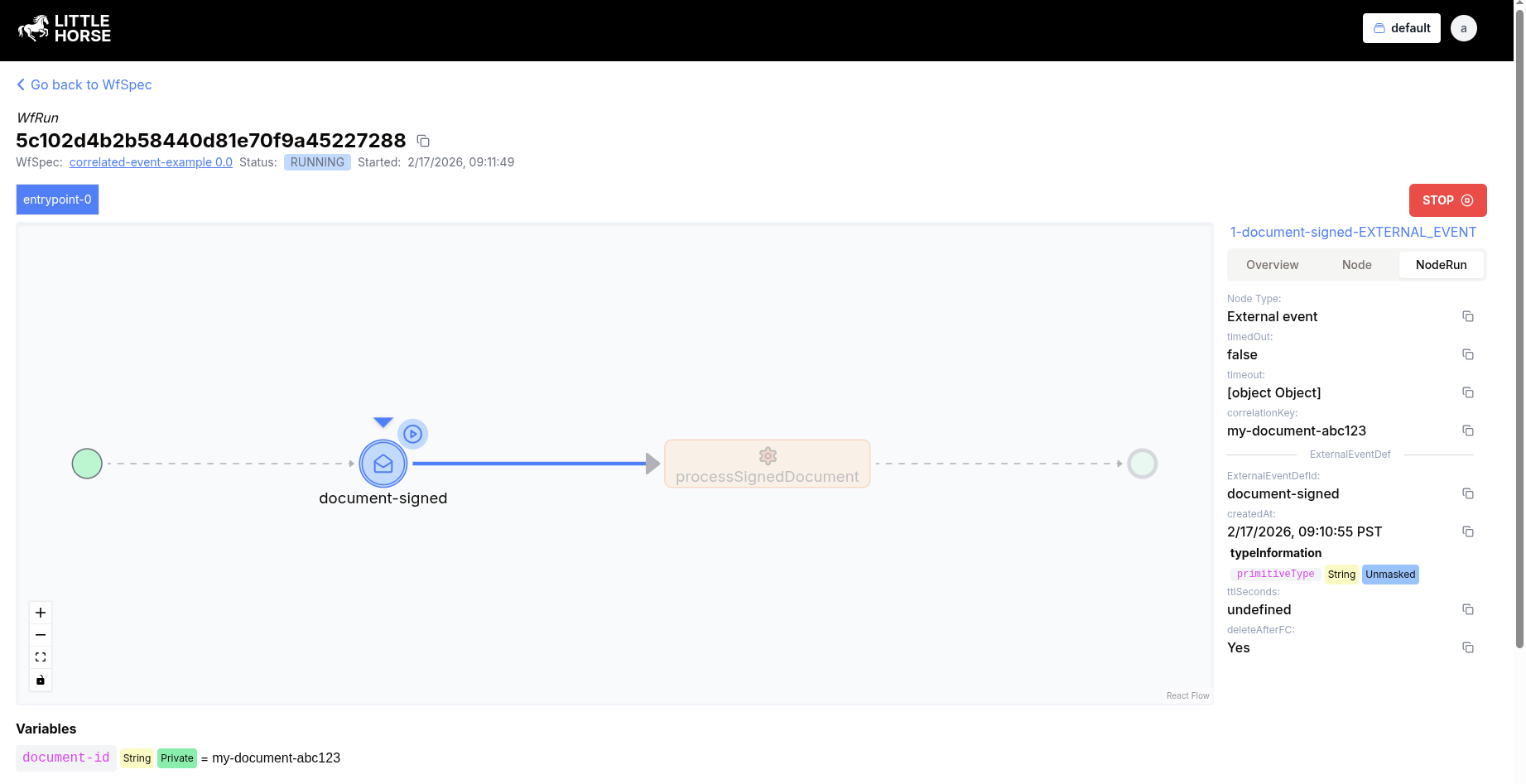
Make note of the WfRunId from the output. If we look at our WfRun in the dashboard, we'll see that it's waiting on the ExternalEventNode — just like a regular External Event workflow.
Posting a CorrelatedEvent
Here's where the magic happens. Instead of calling rpc PutExternalEvent with the WfRunId, we call rpc PutCorrelatedEvent with just the correlation key and the ExternalEventDef name. We don't need to know the WfRunId at all!
With lhctl:
lhctl put correlatedEvent my-document-abc123 document-signed STR "Obi-Wan Kenobi"
We provide the correlation key (my-document-abc123), the ExternalEventDef name (document-signed), the type of the payload, and the payload itself.
Using the SDK's:
- Java
- Python
- Go
- TypeScript
- C#
package io.littlehorse.quickstart;

import io.littlehorse.sdk.common.LHLibUtil;
import io.littlehorse.sdk.common.config.LHConfig;
import io.littlehorse.sdk.common.proto.CorrelatedEvent;
import io.littlehorse.sdk.common.proto.ExternalEventDefId;
import io.littlehorse.sdk.common.proto.PutCorrelatedEventRequest;
import io.littlehorse.sdk.common.proto.LittleHorseGrpc.LittleHorseBlockingStub;

public class Main {

    public static void main(String[] args) {
        LHConfig config = new LHConfig();
        LittleHorseBlockingStub client = config.getBlockingStub();

        PutCorrelatedEventRequest request = PutCorrelatedEventRequest.newBuilder()
                .setKey("my-document-abc123")
                .setExternalEventDefId(ExternalEventDefId.newBuilder()
                        .setName("document-signed"))
                .setContent(LHLibUtil.objToVarVal("Obi-Wan Kenobi"))
                .build();

        CorrelatedEvent result = client.putCorrelatedEvent(request);
        System.out.println(LHLibUtil.protoToJson(result));
    }
}
from littlehorse.config import LHConfig
from littlehorse.model import (
    ExternalEventDefId,
    PutCorrelatedEventRequest,
    VariableValue,
)

if __name__ == "__main__":
    config = LHConfig()
    client = config.stub()

    request = PutCorrelatedEventRequest(
        key="my-document-abc123",
        external_event_def_id=ExternalEventDefId(name="document-signed"),
        content=VariableValue(str="Obi-Wan Kenobi"),
    )

    result = client.PutCorrelatedEvent(request)
    print(result)
package main

import (
    "context"
    "fmt"
    "github.com/littlehorse-enterprises/littlehorse/sdk-go/lhproto"
    "github.com/littlehorse-enterprises/littlehorse/sdk-go/littlehorse"
)

func main() {
    config := littlehorse.NewConfigFromEnv()
    client, _ := config.GetGrpcClient()

    result, _ := (*client).PutCorrelatedEvent(context.Background(),
        &lhproto.PutCorrelatedEventRequest{
            Key: "my-document-abc123",
            ExternalEventDefId: &lhproto.ExternalEventDefId{
                Name: "document-signed",
            },
            Content: &lhproto.VariableValue{
                Value: &lhproto.VariableValue_Str{
                    Str: "Obi-Wan Kenobi",
                },
            },
        },
    )

    fmt.Println("CorrelatedEvent:", result)
}
import { LHConfig } from "littlehorse-client";

const config = LHConfig.from({});
const client = config.getClient();

const result = await client.putCorrelatedEvent({
  key: "my-document-abc123",
  externalEventDefId: { name: "document-signed" },
  content: { value: { oneofKind: "str", str: "Obi-Wan Kenobi" } },
});
console.log(result);
using LittleHorse.Sdk;
using LittleHorse.Sdk.Common.Proto;
using LittleHorse.Sdk.Helper;

namespace Quickstart;

public class Program
{
    static void Main(string[] args)
    {
        var config = new LHConfig();
        var client = config.GetGrpcClientInstance();

        var request = new PutCorrelatedEventRequest
        {
            Key = "my-document-abc123",
            ExternalEventDefId = new ExternalEventDefId
            {
                Name = "document-signed"
            },
            Content = LHMappingHelper.ObjectToVariableValue("Obi-Wan Kenobi")
        };

        CorrelatedEvent result = client.PutCorrelatedEvent(request);
        Console.WriteLine(LHMappingHelper.ProtoToJson(result));
    }
}
Once the CorrelatedEvent is posted, LittleHorse will:
- Find the
WfRunthat is waiting for adocument-signedevent with the correlation keymy-document-abc123. - Automatically create an
ExternalEventon thatWfRun. - The
WfRunwill continue executing—in this case, the payload"Obi-Wan Kenobi"will flow into the next node.
You can inspect the CorrelatedEvent with lhctl:
lhctl get correlatedEvent my-document-abc123 document-signed
Viewing the Correlated Event
You can retrieve a CorrelatedEvent to see its status and which ExternalEvents it has created:
lhctl get correlatedEvent my-document-abc123 document-signed
The output will look something like:
{
  "id": {
    "key": "my-document-abc123",
    "externalEventDefId": {
      "name": "document-signed"
    }
  },
  "createdAt": "2025-02-13T19:17:00.000Z",
  "content": {
    "str": "Obi-Wan Kenobi"
  },
  "externalEvents": [
    {
      "wfRunId": {
        "id": "c6e0b59775f947979a7c16d6313c1a9d"
      },
      "externalEventDefId": {
        "name": "document-signed"
      },
      "guid": "..."
    }
  ]
}
The externalEvents list shows which ExternalEvents were created from this CorrelatedEvent.
Advanced Usage
Event-Before-Workflow (Race Condition Handling)
A powerful feature of CorrelatedEvents is that the event can arrive before the WfRun reaches the ExternalEventNode. LittleHorse handles this gracefully:
- You post a
CorrelatedEventwith keyabc123. - Later, a
WfRunarrives at a node waiting for keyabc123. - LittleHorse immediately matches them and creates the
ExternalEvent.
This eliminates the race condition that would otherwise occur if you had to ensure the workflow was waiting before posting the event.
One-to-Many Correlation
If deleteAfterFirstCorrelation is set to false, a single CorrelatedEvent can match with multiple WfRuns. Each WfRun that waits on the same correlation key will receive its own ExternalEvent created from the same CorrelatedEvent.
Masking the Correlation Key
If your correlation key contains sensitive data (e.g., a social security number or email address), you can mask it so that it is not visible in the LittleHorse Dashboard or API responses:
- Java
- Python
- Go
- TypeScript
- C#
wf.waitForEvent(EVENT_NAME).withCorrelationId(documentId, true);
wf.wait_for_event(EVENT_NAME, correlation_id=document_id, mask_correlation_id=True)
wf.WaitForEvent(EventName).SetCorrelationId(documentId).MaskCorrelationId(true)
wf.waitForEvent("document-signed", {
  correlationId: documentId,
  maskCorrelationId: true,
});
wf.WaitForEvent("document-signed").WithCorrelationId(documentId, true);
Deleting a CorrelatedEvent
You can delete a CorrelatedEvent if it is no longer needed:
lhctl delete correlatedEvent my-document-abc123 document-signed
Further Resources
Congrats on learning how to use CorrelatedEvents! Here are some related topics to explore:
- External Events for the simpler case where you know the
WfRunId. - Timeouts on your
ExternalEventNodes with the.timeout()method. - Interrupts for handling
ExternalEvents that interrupt a runningThreadRun.