Introducing LittleHorse Connectors for Kafka Connect
We are excited to announce the release of the LittleHorse Connectors for Kafka Connect, enabling seamless data transfer between Apache Kafka and LittleHorse workflows.
What are the Kafka Connectors?
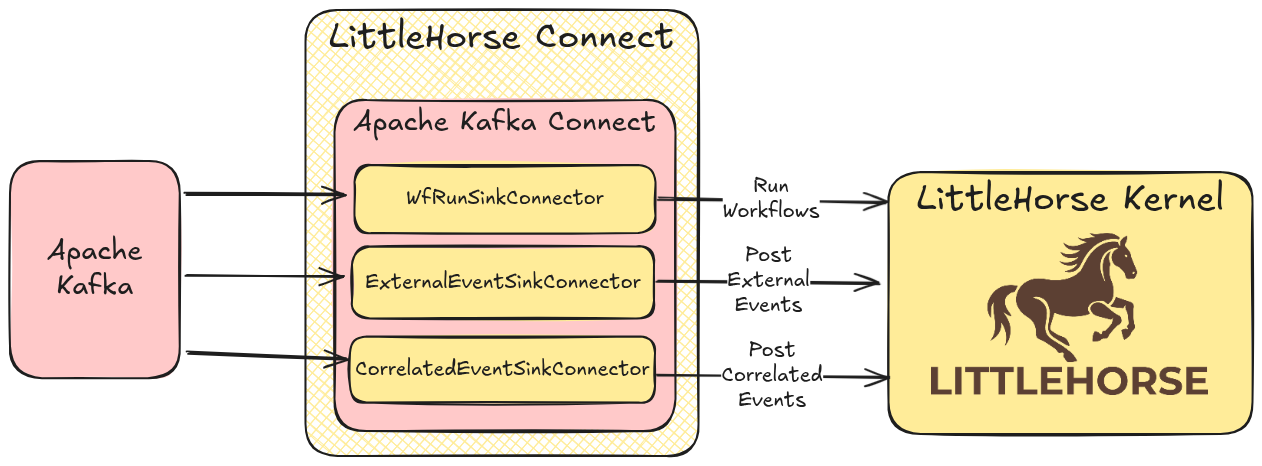
The LittleHorse Connectors for Kafka Connect are a set of three Apache Kafka Connect sink connectors that allow you to trigger workflows and post events directly from Kafka topics. This enables your LittleHorse workflows to react to events in your Kafka ecosystem in real-time.
The three connectors are:
WfRunSinkConnector- Executes aWfRunfor each record in a Kafka topic, supporting all Variable Types provided by LittleHorseExternalEventSinkConnector- Posts anExternalEventfor each record in a Kafka topic, allowing workflows to wait for external eventsCorrelatedEventSinkConnector- Posts aCorrelatedEventfor each record in a Kafka topic, enabling workflows to wait for events with specific correlation IDs
Why Kafka Connectors?
Apache Kafka has become the de facto standard for event streaming and real-time data pipelines. Many organizations already have Kafka infrastructure in place, producing events to topics for various purposes. The LittleHorse Kafka Connectors allow you to leverage this existing infrastructure to trigger and interact with workflows without writing custom integration code.
Key Features
- Real-time Workflow Triggering: Automatically start workflows when events arrive in Kafka topics
- Event-Driven Architecture: Build truly event-driven applications by connecting Kafka events to workflows
- Standard Integration: Use standard Kafka Connect patterns and tooling
- Idempotent Writes: All connectors generate unique IDs for each request to ensure idempotency
- Parallel Processing: Support for multiple tasks through the
tasks.maxconfiguration parameter - Dead Letter Queue: Built-in support for DLQ to handle failed records
- Data Type Awareness: Full support for LittleHorse's data types, including Boolean, String, Integer, and more
- Multiple Converters: Support for Protobuf, JSON, and Avro converters
- External Secrets: Support for external secrets through Kafka Connect's ConfigProvider interface
How It Works
The connectors follow standard Kafka Connect patterns and can be configured just like any other Kafka connector. They read records from Kafka topics and make gRPC requests to your LittleHorse Server to trigger workflows or post events.
Example: WfRunSinkConnector
The WfRunSinkConnector reads records from a Kafka topic and runs a workflow for each record. The connector maps the Kafka record's value to workflow variables, allowing you to pass data from Kafka directly into your workflows.
For a workflow that receives a String parameter called name:
{
  "tasks.max": 2,
  "topics": "names",
  "connector.class": "io.littlehorse.connect.WfRunSinkConnector",
  "key.converter": "org.apache.kafka.connect.storage.StringConverter",
  "value.converter": "org.apache.kafka.connect.json.JsonConverter",
  "value.converter.schemas.enable": false,
  "lhc.api.port": 2023,
  "lhc.api.host": "localhost",
  "lhc.tenant.id": "default",
  "wf.spec.name": "greetings"
}
You can manipulate the message structure with Single Message Transformations (SMTs) to transform data before it reaches LittleHorse.
Installation
The connectors are available as a downloadable package from our GitHub releases. Simply download the latest release and add it to your Kafka Connect worker's plugin path.
For detailed installation instructions, check out our Kafka Connectors documentation.
Requirements
- Java version 17 or greater
- Apache Kafka version 3.8 or greater (equivalent to Confluent Platform 7.8 or greater)
- LittleHorse version 0.14 or greater
Get Started
Ready to integrate Kafka with LittleHorse? Here's how to get started:
- Try the Quickstart: Follow our Kafka Connectors quickstart to see the connectors in action
- Explore Examples: Check out the examples repository for more use cases
- Read the Documentation: Explore the full documentation for detailed configuration options
- Review Configurations: See configuration documentation for all available options
- Join the Community: Connect with other users on Slack to share your experiences and get help
Learn More
Our Founder, Colt McNealy, introduced these connectors at StrimziCon 2025, where he demonstrated how to use them for local Kubernetes development. Check out the talk to see the connectors in action!
The LittleHorse Connectors for Kafka Connect are open-source and available under the Server Side Public License, Version 1. Give us a star on GitHub to support our open-source efforts!