Workflow Migrations
This video was filmed using LittleHorse 1.3.
Workflow Migrations are an experimental feature introduced in LittleHorse 1.2. The API and behavior may change in future releases. Use with caution in production environments.
Motivation
LittleHorse gives developers the power to consolidate workflow logic in a single object, the WfSpec. A WfSpec can map a business process that runs for days, weeks, or even months. Since workflows are long-running and business processes are always changing, an actively running process (WfRun) needs the ability to migrate from one WfSpec to another.
Concepts
In LittleHorse, every WfSpec is versioned. When you register two workflows with the same name, the server stores the second with a new revision or a new majorVersion number. Every WfRun is permanently tied to the WfSpec version it started on, so publishing a new version does not affect processes that are already running.
A workflow migration moves a WfRun from the WfSpec version it started on to a newer one. This lets you roll out bug fixes and new business logic to long-running processes without waiting for them to finish or canceling and restarting them.
Migrating a WfRun is a two-step process:
- Register a
WorkflowMigrationPlanwith the LittleHorse server. - Apply the plan to a
WfRun.
WorkflowMigrationPlan components
The WorkflowMigrationPlan
A WorkflowMigrationPlan is a metadata object that defines how to migrate a WfRun from a specific WfSpec version to a newer version. The WorkflowMigrationPlan has a threadMigrations map that lets you define targeted ThreadMigrationPlans for any given ThreadSpec. The map's key is the name of the ThreadSpec you want to migrate, and the value is a ThreadMigrationPlan.
The ThreadMigrationPlan
The ThreadMigrationPlan is a metadata object that defines how to migrate an individual ThreadSpec to another ThreadSpec in the new WfSpec version. The ThreadMigrationPlan consists of two fields: newThreadName and nodeMigrations. The newThreadName field is the name of the ThreadSpec in the new WfSpec you would like the thread to migrate to. The nodeMigrations field maps a nodeName to a NodeMigrationPlan.
The NodeMigrationPlan
The NodeMigrationPlan has one field, newNodeName. The newNodeName field is the name of the node within the new ThreadSpec we want to migrate to.
Putting these three objects together, a minimal WorkflowMigrationPlan in the SDK looks like this:
PutWorkflowMigrationPlanRequest.newBuilder()
        .setName("onboarding-migration-plan")
        // old_wfSpec: the version WfRuns migrate FROM
        .setOldWfSpec(WfSpecId.newBuilder()
                .setName("onboarding-workflow")
                .setMajorVersion(0)
                .setRevision(0)
                .build())
        // destination version WfRuns migrate TO
        .setMajorVersion(0)
        .setRevision(1)
        // threadMigrationPlan: which threadSpec to migrate
        .putThreadMigrations("entrypoint", ThreadMigrationPlanRequest.newBuilder()
                .setNewThreadName("entrypoint")
                // nodeMigrationPlan: which node to migrate to
                .putNodeMigrations("4-training-complete-EXTERNAL_EVENT", NodeMigrationPlan.newBuilder()
                        .setNewNodeName("4-training-complete-EXTERNAL_EVENT")
                        .build())
                .build())
        .build();
The In Practice section below builds on this shape with a complete, runnable walkthrough.
Semantics
Lazy migration
Applying a WorkflowMigrationPlan does not necessarily migrate every ThreadRun immediately. Each ThreadRun migrates independently when it reaches a node included in its ThreadMigrationPlan. The current node name is matched against the keys in nodeMigrations, and the corresponding NodeMigrationPlan identifies the node where execution should continue in the new ThreadSpec.
Nodes waiting on conditions or external signals migrate right away
If a ThreadRun is already parked at a migration node when the plan is applied, it can migrate immediately when the node is an EXTERNAL_EVENT, USER_TASK, SLEEP, WAIT_FOR_CONDITION, or WAIT_FOR_THREADS node. These nodes are waiting on a condition or an external signal (an external event, user input, a timer, a variable condition, or child threads) rather than doing any computation of their own, so it is safe to move them at once. A USER_TASK is canceled when the ThreadRun migrates to the new ThreadSpec.
Nodes executing work finish first
Nodes that are actively executing work on a task worker are never interrupted. For example, if a TASK node is RUNNING on a worker when the migration request arrives, the ThreadRun will not migrate from that node; the running node is effectively "passed" for the migration, so its NodeMigrationPlan will never fire. The ThreadRun migrates only when it later reaches another node with a matching NodeMigrationPlan further downstream in that same ThreadSpec, preventing in-flight work from being canceled or finished without its result being accounted for.
Migration lifecycle
Whenever a workflow migration completes, the migrated WfSpec version is added to the WfRun's oldWfSpecVersions list and its wfSpecId changes to the version the plan migrates to.
While a migration is in progress, the WfRun holds a workflowMigrationPlanId. This field is removed only once every active ThreadRun is running on the new WfSpec version, ensuring the WfRun is fully migrated before the plan is cleared. Because of this, an applyWorkflowMigrationPlan request is rejected when the WfRun already has a workflowMigrationPlanId stamped on it.
Child thread migrations
Because threadMigrations is a map keyed by ThreadSpec name, a single WorkflowMigrationPlan can migrate more than one ThreadSpec. To migrate a child ThreadSpec add another entry with the child threadSpecs name.
An example of what migrating a child ThreadSpec could look like:
.putThreadMigrations(
        // Child threadSpec to migrate FROM
        "background-check",
        ThreadMigrationPlanRequest.newBuilder()
                .setNewThreadName("background-check")
                .putNodeMigrations(
                        "1-await-results-EXTERNAL_EVENT",
                        NodeMigrationPlan.newBuilder()
                                .setNewNodeName("1-await-results-EXTERNAL_EVENT")
                                .build())
                .build())
Each thread migrates independently when its own ThreadRun reaches a migration node. Note that a ThreadMigrationPlan cannot cross the entrypoint/child boundary: mapping an entrypoint ThreadRun to a child ThreadSpec, or a child ThreadRun to an entrypoint ThreadSpec, is rejected by the LittleHorse server.
ThreadSpecA WorkflowMigrationPlan only migrates the threads it names in threadMigrations. If you provide a ThreadMigrationPlan for a child ThreadSpec but not for the entrypoint, then only that child ThreadRun migrates to the new WfSpec version. The entrypoint and any other unlisted ThreadRuns keep running on their original version.
Since the workflowMigrationPlanId is only removed once every active ThreadRun is running on the new WfSpec version, a plan that leaves any active thread behind will stay stamped on the WfRun for the remainder of its life.
See Migration lifecycle for more on how the workflowMigrationPlanId is tracked and removed.
Variable handling
When migrating between WfSpecs, variable values are carried over rather than reset, so any variable created under the previous WfSpec is retained on the WfRun. During migration, if a VariableDef in the new WfSpec does not have a variable instance yet, one is created. If it already has one, the previous value is carried over. The exception is when the previous value is null: if the new VariableDef defines a default value, that default is applied instead of the null.
In Practice
The rest of this page walks through a complete migration. You can follow along with the runnable example in the lh-developer-hub, which is driven by four steps:
| Command | What it does |
|---|---|
step1 | Registers the WfSpecs and TaskDefs, and starts the task workers. |
step2 | Registers the WorkflowMigrationPlan. |
step3 <wfRunId> | Applies the WorkflowMigrationPlan to a WfRun. |
step4 <wfRunId> | Applies the WorkflowMigrationPlan to a WfRun with a migration variable. |
Each step is run with ./gradlew :examples:lh-server:java:workflow-migrations:run --args='<step> [wfRunId]'. Throughout the walkthroughs, <wfRunId> refers to the ID printed by lhctl run.
In order to create a WorkflowMigrationPlan with the LittleHorse server, we will first need to register two WfSpecs.
Registering a WfSpec
    Workflow wfGen = Workflow.newWorkflow("onboarding-workflow", wf->{
      WfRunVariable name = wf.declareStr("name").withDefault("DEFAULT");
      wf.execute("create-employee-record");
      wf.execute("send-onboarding-email");
      wf.waitForEvent("sign-employee-agreement");
      wf.waitForEvent("training-complete");
    });
This is a simple onboarding workflow with only one ThreadSpec, the entrypoint. This onboarding WfSpec would be registered with majorVersion 0 and revision 0.
Now let's imagine we received a new ticket and our workflow needs to grant users system access after they've finished all of their onboarding tasks. That would look something like this:
    Workflow wfGenTwo = Workflow.newWorkflow("onboarding-workflow", wf->{
      WfRunVariable name = wf.declareStr("name").withDefault("DEFAULT");
      wf.execute("create-employee-record");
      wf.execute("send-onboarding-email");
      wf.waitForEvent("sign-employee-agreement");
      wf.waitForEvent("training-complete");
      wf.execute("grant-system-access", name);
    });
This new WfSpec would be registered as onboarding-workflow majorVersion 0, revision 1.
If you're following along with the example, run step1 to register both WfSpecs and their TaskDefs and start the task workers:
./gradlew :examples:lh-server:java:workflow-migrations:run --args='step1'
Registering a WorkflowMigrationPlan
Now that we have two WfSpecs registered on the LittleHorse server, we can start thinking about how to migrate an actively running process (WfRun) from onboarding-workflow majorVersion 0, revision 0 to the new WfSpec onboarding-workflow majorVersion 0, revision 1.
LittleHorse provides two methods for constructing and registering your WorkflowMigrationPlan: the LittleHorse SDK and lhctl.
Using the SDK
Let's create a WorkflowMigrationPlan with the LittleHorse SDK that migrates a WfRun from onboarding-workflow majorVersion 0, revision 0 to onboarding-workflow majorVersion 0, revision 1.
Constructing our WorkflowMigrationPlan and registering it with the LittleHorse server would look something like this:
PutWorkflowMigrationPlanRequest request = PutWorkflowMigrationPlanRequest.newBuilder()
                .setName("onboarding-migration-plan")
                // old_wfSpec: the version WfRuns are migrating FROM
                .setOldWfSpec(WfSpecId.newBuilder()
                        .setName("onboarding-workflow")
                        .setMajorVersion(0)
                        .setRevision(0)
                        .build())
                // destination version WfRuns are migrating TO
                .setMajorVersion(0)
                .setRevision(1)
                .putThreadMigrations(
                        // Source thread to migrate FROM
                        "entrypoint",
                        ThreadMigrationPlanRequest.newBuilder()
                                // Destination threadSpec to migrate TO
                                .setNewThreadName("entrypoint")
                                .putNodeMigrations(
                                // Source node to migrate from
                                        "4-training-complete-EXTERNAL_EVENT",
                                        NodeMigrationPlan.newBuilder()
                                        // Destination node in the new wfSpec
                                                .setNewNodeName("4-training-complete-EXTERNAL_EVENT")
                                                .build())
                                .putNodeMigrations(
                                // Other Source Node to migrate from
                                        "3-sign-employee-agreement-EXTERNAL_EVENT",
                                        NodeMigrationPlan.newBuilder()
                                        // Destination node in new wfSpec
                                                .setNewNodeName("3-sign-employee-agreement-EXTERNAL_EVENT")
                                                .build())
                                .build())
                .build();

                WorkflowMigrationPlan plan = client.putWorkflowMigrationPlan(request);
This will register a WorkflowMigrationPlan on the LittleHorse server. If the WorkflowMigrationPlan were read in plain English, it would read something like:
Create a
WorkflowMigrationPlanwhere the entrypointThreadSpecon the currentWfRunmigrates to the entrypointThreadSpecon the newWfSpec. If theThreadRunis at3-sign-employee-agreement-EXTERNAL_EVENT, then migrate to3-sign-employee-agreement-EXTERNAL_EVENTin the newWfSpec; but if theThreadRunis at4-training-complete-EXTERNAL_EVENT, then migrate to4-training-complete-EXTERNAL_EVENTin the newWfSpec.
If you're following along with the example, run step2 to register the WorkflowMigrationPlan:
./gradlew :examples:lh-server:java:workflow-migrations:run --args='step2'
Using lhctl
lhctl allows you to build a WorkflowMigrationPlan interactively.
If we wanted to register one, we would run:
lhctl put workflowMigrationPlan
Name of the WorkflowMigrationPlan: onboarding-migration-plan
Old WfSpec name: onboarding-workflow
Old WfSpec major version: 0
Old WfSpec revision: 0
New (destination) major version: 0
New (destination) revision: 1

Thread migrations (leave the old threadSpec name empty to finish):
  Old threadSpec name: entrypoint
  New threadSpec name: entrypoint
    Node migrations (leave the old node name empty to finish):
      Old node name: 4-training-complete-EXTERNAL_EVENT
      New node name: 4-training-complete-EXTERNAL_EVENT
      Old node name: 3-sign-employee-agreement-EXTERNAL_EVENT
      New node name: 3-sign-employee-agreement-EXTERNAL_EVENT
      Old node name:
  Old threadSpec name:
Searching for WorkflowMigrationPlans
You can search for registered WorkflowMigrationPlans by plan-name prefix or by the name of their source WfSpec. If you do not provide a filter, the search returns all migration plan IDs.
Use lhctl to search without a filter:
lhctl search workflowMigrationPlan
Use --prefix to find plans whose names begin with a specific value, or use --wfSpecName to find plans that migrate from a specific WfSpec:
lhctl search workflowMigrationPlan --prefix onboarding
lhctl search workflowMigrationPlan --wfSpecName onboarding-workflow
The --prefix and --wfSpecName filters are mutually exclusive.
Applying a WorkflowMigrationPlan
After registering a WorkflowMigrationPlan, you can apply it to any WfRun that has the oldWfSpecId.
Walkthrough
To continue with our example, let's create a WfRun for the onboarding workflow. Run the following command with lhctl:
lhctl run onboarding-workflow --majorVersion 0 --revision 0
lhctl run prints the wfRunId of the new WfRun. Copy it, since you'll substitute it for <wfRunId> in the commands below.
Now that we have a WfRun operating under the old WfSpec, we can apply the WorkflowMigrationPlan:
lhctl apply workflowMigrationPlan <planName> <wfRunId>
Or, if you're following along with the example, run the same step programmatically:
./gradlew :examples:lh-server:java:workflow-migrations:run --args='step3 <wfRunId>'
If you use lhctl, you will be prompted for any migration variables. For this example, press Enter and leave the field empty.
After applying the WorkflowMigrationPlan, you will see the following fields in the WfRun:
},
  "wfSpecId": {
    "name": "onboarding-workflow",
    "majorVersion": 0,
    "revision": 1
  },
  "oldWfSpecVersions": [
    {
      "name": "onboarding-workflow",
      "majorVersion": 0,
      "revision": 0
    }
  ],
Migration lifecycle in practice
Notice that the wfSpecId was bumped to revision 1 and the previous WfSpec was added to oldWfSpecVersions, so the WfRun is now running on the new version. See Migration lifecycle for the rules governing this transition and how the workflowMigrationPlanId is tracked and removed.
Now let's examine the WfRun a little deeper by grabbing some NodeRuns:
lhctl get nodeRun <wfRunId> 0 3
We get something like this in return:
{
  "id": {
    "wfRunId": {
      "id": "baefadca5b874ca787ec15f04dbf5cf0"
    },
    "threadRunNumber": 0,
    "position": 3
  },
  "wfSpecId": {
    "name": "onboarding-workflow",
    "majorVersion": 0,
    "revision": 0
  },
  "failureHandlerIds": [],
  "status": "HALTED",
  "arrivalTime": "2026-07-14T17:21:07.242Z",
  "threadSpecName": "entrypoint",
  "nodeName": "3-sign-employee-agreement-EXTERNAL_EVENT",
  "failures": [],
  "externalEvent": {
    "externalEventDefId": {
      "name": "sign-employee-agreement"
    },
    "timedOut": false,
    "maskCorrelationKey": false
  }
}
NodeRun 3 was the active NodeRun when the migration request was sent. Since the NodeRun belongs to an EXTERNAL_EVENT node, the NodeRun was HALTED and migration immediately followed.
Now let's grab the next NodeRun created in the WfRun:
lhctl get nodeRun <wfRunId> 0 4
{
  "id": {
    "wfRunId": {
      "id": "baefadca5b874ca787ec15f04dbf5cf0"
    },
    "threadRunNumber": 0,
    "position": 4
  },
  "wfSpecId": {
    "name": "onboarding-workflow",
    "majorVersion": 0,
    "revision": 1
  },
  "failureHandlerIds": [],
  "status": "RUNNING",
  "arrivalTime": "2026-07-14T17:30:17.931Z",
  "threadSpecName": "entrypoint",
  "nodeName": "3-sign-employee-agreement-EXTERNAL_EVENT",
  "failures": [],
  "externalEvent": {
    "externalEventDefId": {
      "name": "sign-employee-agreement"
    },
    "timedOut": false,
    "maskCorrelationKey": false
  }
}
We can see that NodeRun 4 is the new node that was in the NodeMigrationPlan. If you look at the wfSpecId, you can see this node belongs to onboarding-workflow majorVersion 0, revision 1.
Now when you view the LittleHorse dashboard, you can see that the WfRun is now using the new WfSpec version.
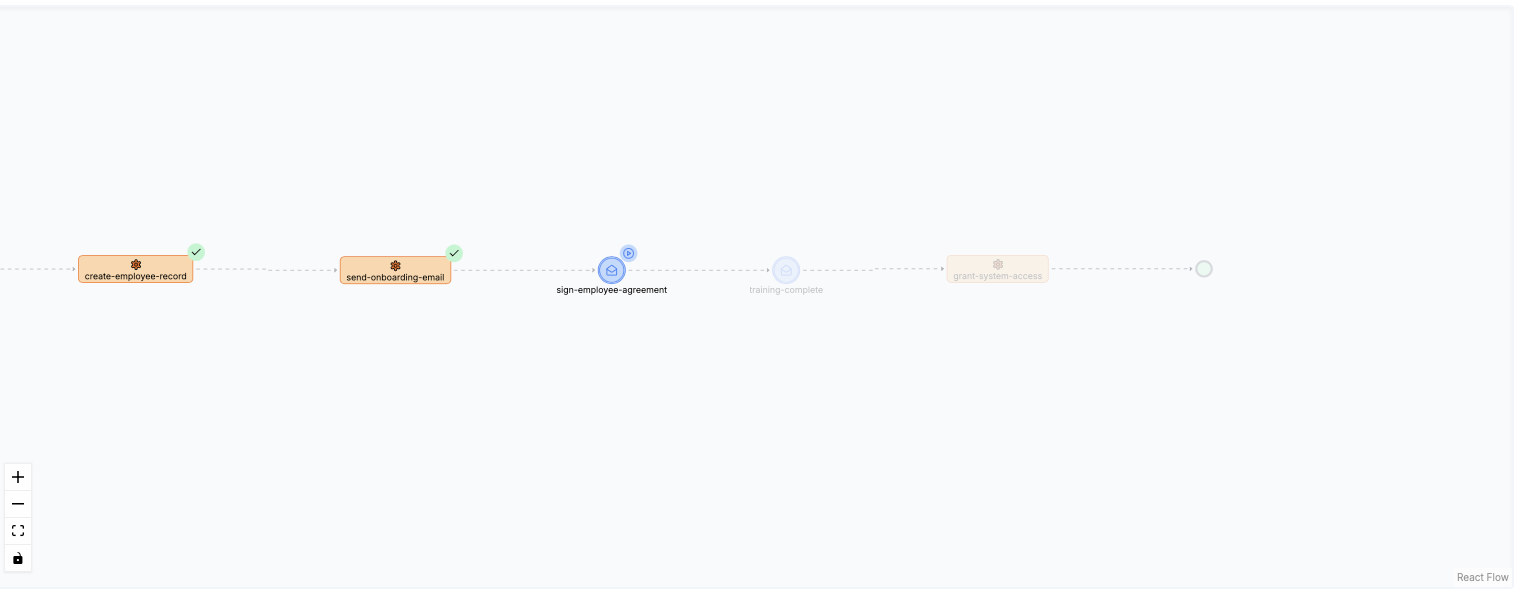
Congratulations, you successfully migrated a live running WfSpec instance to a new WfSpec! If you wish, you can post the external events with lhctl to complete the WfRun.
Migration variables
Migration variables let you set a WfRun's variable values at migration time, so a thread can start on the new WfSpec version with the data it needs. You choose which thread each set of values applies to, targeting them at the thread the WfRun is migrating to.
For each variable you supply a VariableAssignment, which is evaluated against the WfRun's runtime state during migration. Migration variables support any VariableAssignment, so you can source a value from a previous NodeRun output, a format string, another variable, or a literal VariableValue.
Walkthrough
This example reuses the onboarding-workflow WfSpecs and the WorkflowMigrationPlan from the earlier walkthrough. There is no need to register anything with the server if you already completed the previous example.
Start a new WfRun and note the wfRunId it returns:
lhctl run onboarding-workflow --majorVersion 0 --revision 0
This time we apply the WorkflowMigrationPlan with a migration variable for name. Set the wfRunId below to the value returned above:
        LHConfig config = new LHConfig();
        LittleHorseBlockingStub stub = config.getBlockingStub();

        MigrationVars migrationVars = MigrationVars.newBuilder()
            .putVarAssignmentByVarName(
                "name",
                VariableAssignment.newBuilder()
                    .setLiteralValue(VariableValue.newBuilder().setStr("obi-wan").build())
                    .build())
            .build();

        ApplyWorkflowMigrationPlanRequest req = ApplyWorkflowMigrationPlanRequest.newBuilder().setId(
            WorkflowMigrationPlanId.newBuilder().setName("onboarding-migration-plan").build())
            .setWfRunId(WfRunId.newBuilder().setId("<wfRunId>").build())
            // Key is the destination (new) thread name.
            .putMigrationVarsByThread("entrypoint", migrationVars)
            .build();

        stub.applyWorkflowMigrationPlan(req);
If you're following along with the example, this is what step4 runs. Execute it with:
./gradlew :examples:lh-server:java:workflow-migrations:run --args='step4 <wfRunId>'
Once the migration is applied, check the name variable to confirm it was set:
lhctl get variable <wfRunId> 0 name
{
  "id": {
    "wfRunId": {
      "id": "1268c3a1f8e94fa0963aeb5edbb9d912"
    },
    "threadRunNumber": 0,
    "name": "name"
  },
  "value": {
    "str": "obi-wan"
  },
  "createdAt": "2026-08-03T22:40:23.001Z",
  "wfSpecId": {
    "name": "onboarding-workflow",
    "majorVersion": 0,
    "revision": 0
  },
  "masked": false
}
After applying the WorkflowMigrationPlan, you can see the name variable value updated to obi-wan
Further references
- WfSpec Versioning: how LittleHorse versions
WfSpecs intorevisions andmajorVersions. - Variables: declaring and using
WfRunvariables andVariableAssignments. - Threads: how
ThreadRuns work, which migrations operate on.